You saw the setup.
You just didn't trust it.
The level was already on your chart before the move — you just had no reason to believe it. 24 TradingView indicators mark it while the candle is still open, and Setup Finder tells you which three belong together for the way you actually trade.

Every wick past a high is called a liquidity sweep. Most of them are just a break.

Most losing entries were technically correct. They were just taken while the higher timeframes disagreed.

A colour change is not a trend. It is a colour change.
Both sides of that chart are the same XAUUSD candles. Everything on the right was already there on the left — the sweep, the shift, the zone, the level where the trade was over. The difference is that it gets named while the candle is still open, instead of after you have decided.
🧹 A sweep is not a breakout
On the left that low is just a low. On the right it is marked SSL, and the candle that ran through it is labelled SWEEP — liquidity taken, structure intact.
🔄 The turn is dated, not guessed
CHoCH and BOS print on bar close and never move again. A month later the history shows the same marks in the same places.
🏷️ The trade arrives as numbers
Entry, stop, TP1 at 1.8R and TP2 at 3.2R are written in the price gutter before you click. Your risk is read, not estimated.
🚫 Not trading is also an output
QUALITY 82 · CLEAN is the verdict on the market, judged before the setup. Score the conditions low and this same pattern never gets marked.
Real traders. Real, unedited reviews.
Straight from the tradewsamet scripts on TradingView — 34 of them, screenshotted, nothing rewritten and nothing removed.


One membership. Every engine on your chart.
Pick the one engine you already trust, or put all 24 indicators on your chart with PRO+ — every future release included. One bad trade avoided covers the month.
Single Indicator
- One premium indicator, yours to keep using
- Its preset and its written guide
- Updates and changelog
- Cancel in two clicks on Whop
PRO+ · All Access
- All 24 indicators
- Every future release
- Written guide for every tool
- Premium dashboard content
- Priority support
- Secure checkout by Whop
- Updates reach your chart automatically
- Cancel anytime, no lock-in
Not ready to pay? 19 of the indicators are open-source on TradingView — add them from there, no membership involved. See which ones →
Payments processed by Whop. Card details never reach our servers.
Three tools carry most of the work. Here is what they do.

Don't chase every gap. Wait for the inversion — then check the structure.
Most gap tools mark every imbalance and leave you to guess. This one waits for the inversion to confirm, then filters it through six layers before it ever reaches your chart.
- Inversion FVG engine
- Chart + HTF-1 + HTF-2 detection
- Liquidity sweep engine
- HTF bias filter

A sweep alone tells you nothing. The edge is in everything that surrounds it.
Sixteen confluence models run in the background. You pick the one to trade — and the dashboard shows you which one is actually working.
- Liquidity map: BSL / SSL / EQH / EQL
- Qualified sweep engine
- 16 confluence models
- Virtual model dashboard

Most losing trades aren't bad entries. They're good entries taken in a market that was never tradeable.
It never tells you to buy or sell. It tells you when the market is too noisy to trade your edge at all.
- Two-state quality model
- Eight quality modules
- Adaptive Market Engine
- Fakeout & wick lock
Setup Finder builds the system. You run it today.
Buying indicators is the easy part. Knowing which three belong together, on your pair, in your session, is where most traders stall for a year.
Nine questions, then a system with your name on it.
It asks what you trade, when you are at the screen and how you like to take entries — then assembles entry, confirmation and filter from the tools you actually have access to. If a gap is worth filling it says so plainly, and if it is not, it tells you to keep your money.
- Answer nine short questionsNo account, no email, no card — it runs right here on the site.
- It often matches by question fourThe moment the answer is unambiguous, it stops asking.
- You get a named three-part systemEntry, confirmation, filter — with the reason each was chosen.
- Every part links to its guide and presetCopy the settings, read the page, apply it the same day.
Scoring a sample answer set…
Run the open-source part of it today
The open-source tools in your system are public on TradingView — add them from there in one click, no sign-up. PRO+ unlocks the premium parts whenever you want them.
- Works on a free TradingView plan
- 19 open-source tools, no membership needed
- PRO+ unlocks every premium tool at once
The complete library. 24 tools to read, confirm and execute.
Hover any card to watch it replay a real setup. 19 are free and open-source — read the Pine line by line before you trust it. 4 are invite-only PRO+, and 1 more is invite-only but free.
Anti-Chop Filter Pro
It never tells you to buy or sell. It tells you when the market is too noisy to trade your edge at all.

Candle Pressure Flip Engine
Five conditions have to agree before a flip prints — exhaustion, wick, close, volume and momentum. One alone is just a candle.
IFVG Machine Learning Model
Most gap tools mark every imbalance and leave you to guess. This one waits for the inversion to confirm, then filters it through six layers before it ever reaches your chart.

IFVG Sniper Entry Engine
An FVG forms, gets stored, and only matters when price breaks through the other side. Inversion first, then one filtered, sniper-style entry.

Liquidity Entry Zones
A sweep alone means nothing. A sweep that gets reclaimed — with the right candle — is a setup.
Liquidity Intelligence Entry System
Sixteen confluence models run in the background. You pick the one to trade — and the dashboard shows you which one is actually working.

Pullback Sniper Method
Chasing the breakout is how you get wicked out. This waits for the pullback to hold, then confirms before it commits.

Pulse Entry Engine
A single oscillator cross means little. A stretch that's extreme, scored and confirmed — that's a pulse worth reading.

Reaction Entry Engine
Most zones get drawn after they already worked. This one grades them before price arrives.

Reversal Entry Zones
Most tools draw a pivot the instant it forms. This one waits for the reversal to earn it.

RSI Entry Engine
RSI tells you when price is stretched. This shows you when it actually turns.

Smart Reversal Entry
Most reversal tools fire on any single candle. This one waits for the move, the context and the close — all three.
Liquidity Sweep Entry Engine
Eight qualification layers, a 0–100 quality score, two profiles, 14 background combinations — and only then one managed trade.
Structure Sync Entry Engine
It classifies every structure break into Primary A, Scalp A or Scalp B — and only the fully synchronized one is allowed to open a trade.
Trend Scalper Entry
One signal per trend state — released only after conviction, efficiency and body strength all agree, inside a window that closes.

FVG Retest Entry Engine
Structure breaks, one gap gets armed, and nothing happens until price comes back and the retest actually confirms. Everything else stays off your chart.

MACD Momentum Entry Engine
Four event types, three independent score engines, one composite grade — and only then a three-target trade model.

Pivot Sniper Method
A 0–100 score printed on every signal, four stop models, three targets, break-even — and a dashboard that shows which component earned the score.

RSI Divergence Entry Engine
Confirmed pivots, divergence in both panes, an optional trend filter, and an ATR trade model with three targets — all open-source.

SMT Sniper Entry Engine
Two correlated instruments, one swept level, one disagreement — scored, confirmed on close, and turned into a two-target trade.

Sweep Reclaim Entry Engine
Every wick beyond a high looks like a sweep. This one waits for the reclaim, scores it out of 100, and only then draws a trade.
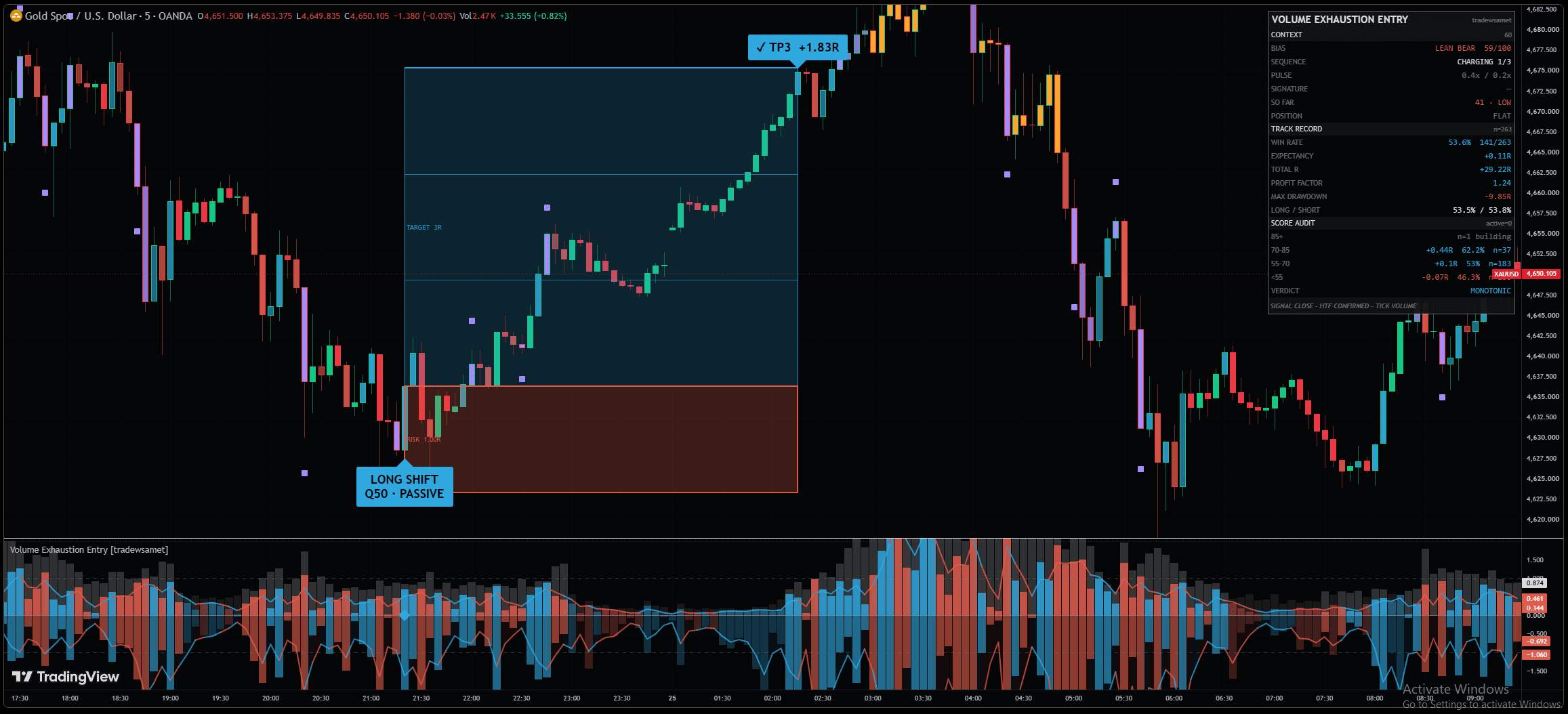
Volume Exhaustion Entry
A sequence has to prove participation, lose efficiency and then get answered by a real opposite shift — only then is it a setup.
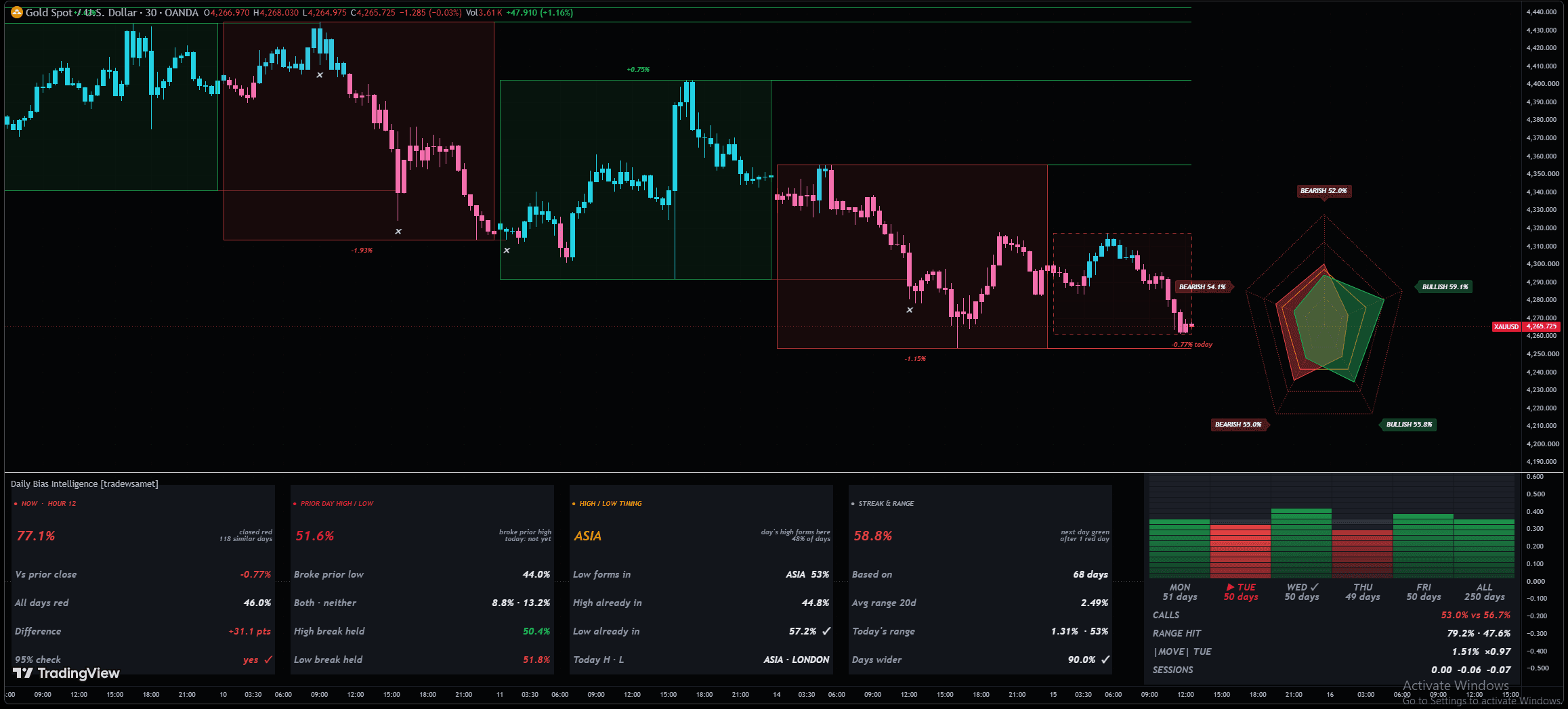
Daily Bias Intelligence
Five historical checks, each needing enough days and a significance test. Only then do they get to lean the day.
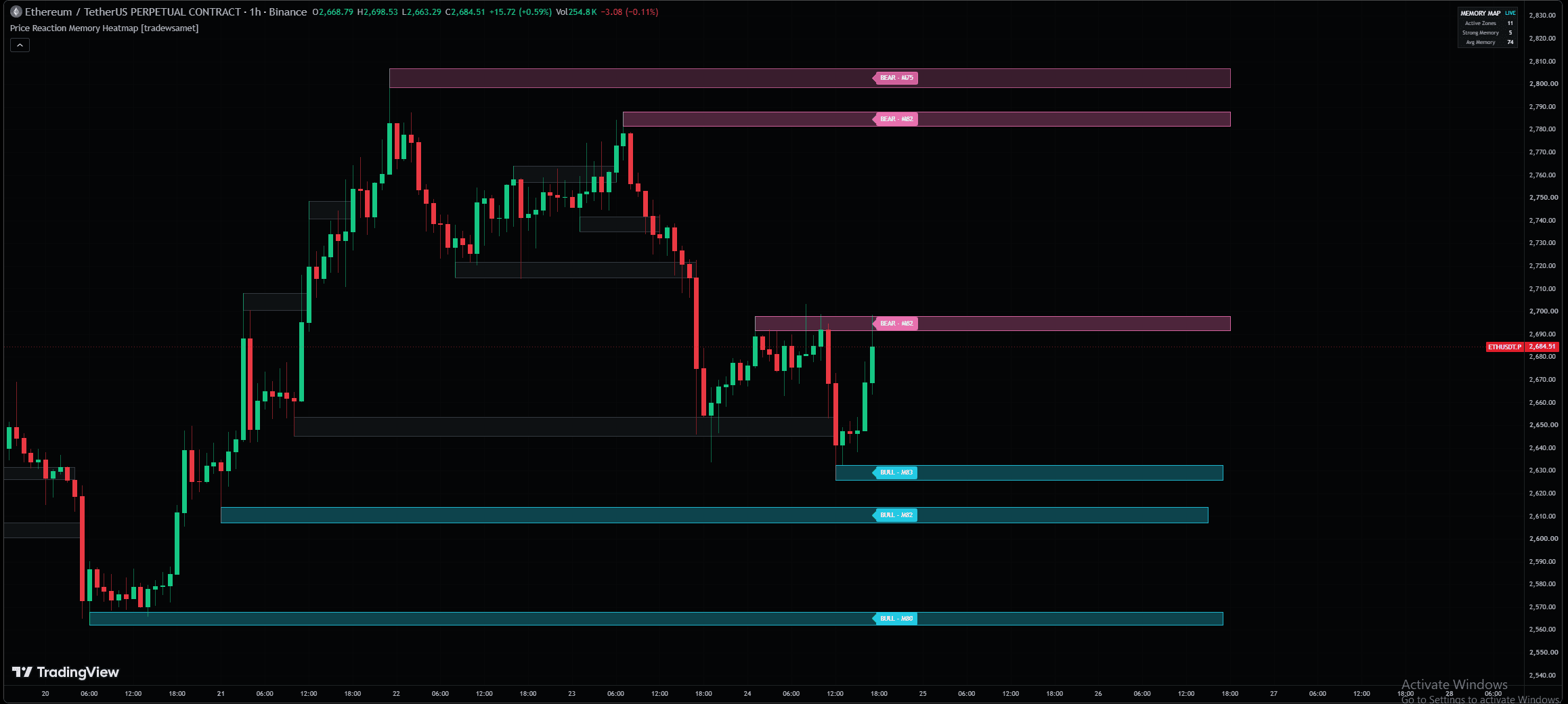
Price Reaction Memory Heatmap
Every zone keeps its own history. Retests, penetration and time can strengthen it, wear it down or retire it.
Not sure where to start? Run the Setup Finder →
FAQs
Cannot find what you are looking for? Support answers within a business day.
Choose a plan on Whop and sign in with the same account — there is no password to remember. The PRO+ indicators are invite-only: you enter your TradingView username once and access is granted to it, usually within 30 minutes. The open-source ones are public Pine scripts you add from TradingView in one click, no membership involved. Everything you own shows up in your dashboard.
Yes. Most of the library is open-source on TradingView — complete indicators, not demos — so you can read every rule and run them on your own chart before you pay for anything. Every premium tool also has its rules, timeframes and settings published on its own page, with a replay of a real setup.
Because you do not have to trust them — you can check them. The rules, timeframes, markets and settings for every tool are published on its own page before you pay for anything, most of the library is open-source, and nothing repaints. If a tool is not right for how you trade, Setup Finder will say so instead of selling it to you.
Buying indicators is the easy part. Knowing which three belong together — one to enter, one to confirm, one to tell you whether the market is worth trading at all — is where most traders stall for a year. Setup Finder asks nine questions about your market, timeframe and risk and hands you that three-tool system, with the reason each one was chosen and the preset to load.
Whop handles the membership and grants invite-only script access to your TradingView username. It usually completes within 30 minutes, and your dashboard shows the exact state the whole way — requested, processing, granted. Nothing is left for you to guess at.
Sign in with the same Whop account and the dashboard opens: you are walked through adding your TradingView username and running Setup Finder. Within half an hour the scripts are on your chart with a written guide and a preset for each one. There is no onboarding call and nothing to configure.
No. Everything works on a free TradingView account.
Every indicator ships with a written page-by-page guide, a preset and a clear “best for” line, and Setup Finder is built precisely so you do not have to already know which tools go together. Start with the open-source ones, read the rules, and only pay when you can see why a premium tool is worth it.
All markets and all timeframes — gold, forex, crypto and indices. Each indicator page states what it was built and tested around, so you are not guessing whether it suits your pair.
No. Every signal confirms on bar close and stays where it printed. Most of the library is open-source, so you can read the logic yourself rather than take our word for it.
Yes, in a couple of clicks on Whop. Access runs to the end of the period you paid for, then the premium scripts are removed. The open-source indicators stay on TradingView for anyone — cancelling never takes you back to zero.
No. Every product is a digital good that grants immediate access, so all sales are final. That is exactly why so much of the library is open-source and why every rule is published before you pay — so the decision is made with the information in front of you, not after.
Nobody trades better alone
The Discord is free and open before you buy anything — sit in it, read the sessions, decide for yourself.
The next setup is already forming.
Decide with the level, not after it.
19 indicators open-source on TradingView · cancel PRO+ in two clicks on Whop